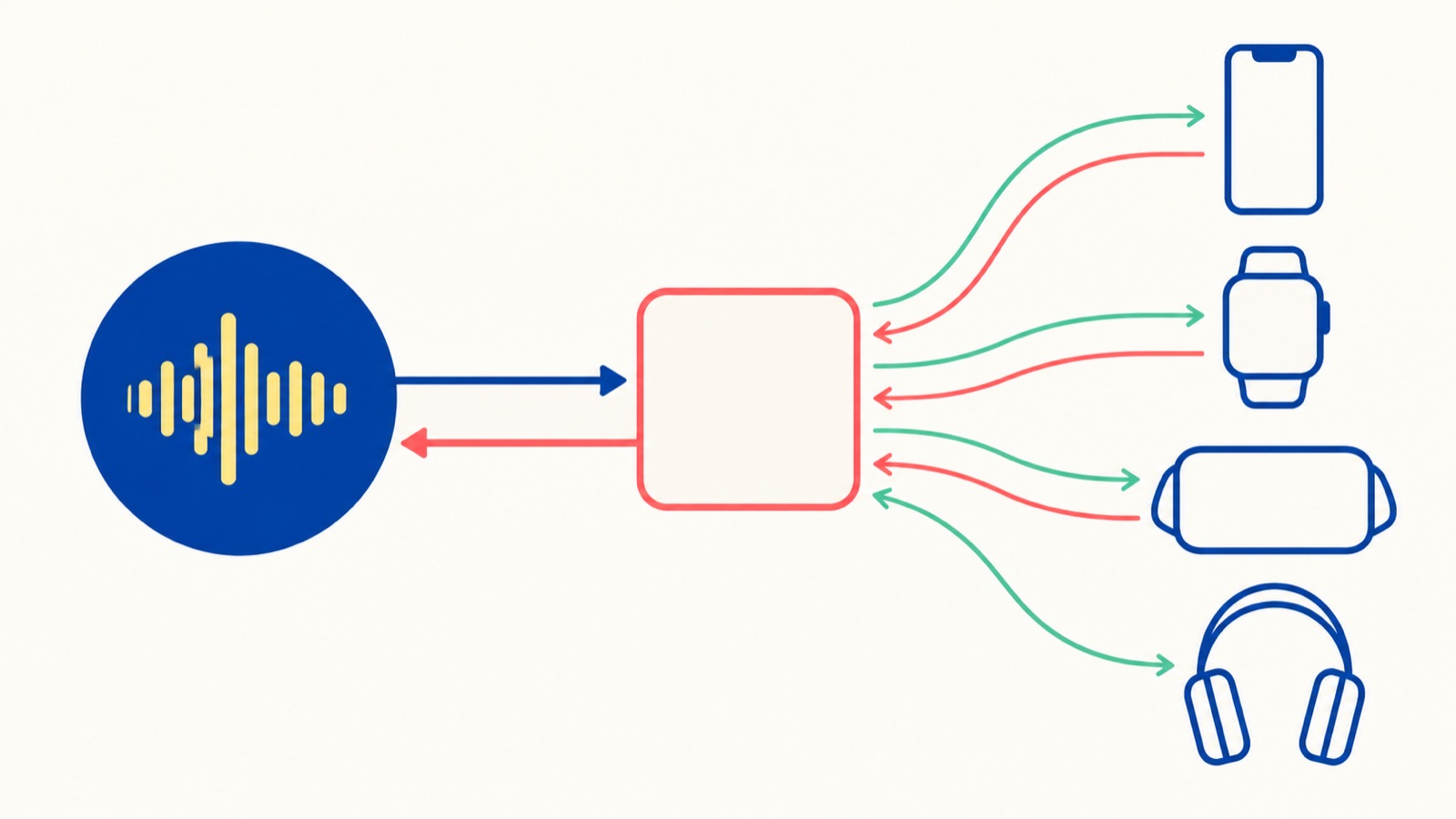
Your ambient-audio app is playing rain on the roof. The in-app pause button works, but the Lock Screen still shows yesterday’s forest track, the elapsed state is wrong in Control Center, and a headset button does nothing. The audio engine is healthy; the contract between the engine and the system is not.
Apple introduced the Swift-based Now Playing framework at WWDC26 to make that contract explicit. You expose an observable model containing identity, content, playback state, and commands. A MediaSession observes it and keeps supported system surfaces current. For playback on a smart speaker or TV, remote media sessions carry the same model into an app extension and can receive server updates through APNs.
This article uses an ambient-sound app throughout. The local examples follow Apple’s Publishing media sessions documentation and WWDC26 session, Meet the Now Playing framework. The documentation still labels these APIs as beta, so verify signatures in the SDK you ship. Build the iPhone implementation with the Xcode 27 SDK and gate it to iOS 27 or later.
1. Treat Now Playing as a Projection of Your Player
MediaSessionRepresentable is @MainActor and Identifiable. It asks for four values:
id, the stable identity of this playback session.content, structured metadata for the current item.playbackSnapshot, the current state and timing.commands, the actions the system may send back.
The model should project one authoritative player. Do not create a second queue or playback boolean just for system UI. Every in-app control, interruption callback, route change, and system command must converge on the same state owner. That is the same ownership rule that makes Swift Observation and @Observable state predictable.
For this example, assume the app already has an audio engine with this small interface:
import Foundation

struct AmbientSound: Identifiable, Sendable {
    let id: String
    let name: String
    let summary: String
}

@MainActor
protocol AmbientAudioEngine: AnyObject {
    var isPlaying: Bool { get }
    func play(_ sound: AmbientSound) throws
    func pause()
}
The engine owns audio. The model owns the queue selection and translates engine state for Now Playing.
2. Publish Content, State, and Commands
Apple provides structured content types for music, podcasts, movies, TV shows, books, radio, home media, and generic content. Our endless rain loop is not a song with a finite timeline, so GenericContent with .continuous duration is the honest representation. Continuous content has no defined end but is not a live broadcast; reserve .live for genuine live or streaming content whose relationship to real time matters.
import Foundation
import NowPlaying
import Observation

@Observable
@MainActor
final class AmbientPlayerModel: MediaSessionRepresentable {
    let id = "com.warmodroid.ambient.local"

    private let engine: any AmbientAudioEngine
    private let sounds: [AmbientSound]
    private(set) var selectedIndex = 0
    private(set) var isPlaying = false
    private(set) var intendsPlayback = false

    init(engine: any AmbientAudioEngine, sounds: [AmbientSound]) {
        precondition(!sounds.isEmpty)
        self.engine = engine
        self.sounds = sounds
        self.isPlaying = engine.isPlaying
    }

    private var sound: AmbientSound { sounds[selectedIndex] }

    var content: (any MediaContentRepresentable)? {
        GenericContent(
            id: sound.id,
            title: sound.name,
            subtitle: sound.summary,
            type: .audio,
            duration: .continuous,
            artwork: Artwork(id: sound.id) { [sound] size in
                let data = try await ArtworkStore.shared.data(
                    for: sound.id,
                    pixelSize: size
                )
                return try ArtworkRepresentation(data: data)
            }
        )
    }

    var playbackSnapshot: MediaPlaybackSnapshot? {
        MediaPlaybackSnapshot(
            state: isPlaying ? .playing() : .paused
        )
    }

    var commands: [MediaCommand] {
        [
            .play { try self.play() },
            .pause { self.pause() },
            .previous { try self.select(offset: -1) }
                .enabled(sounds.count > 1),
            .next { try self.select(offset: 1) }
                .enabled(sounds.count > 1)
        ]
    }

    func play() throws {
        try engine.play(sound)
        isPlaying = true
        intendsPlayback = true
    }

    func pause() {
        engine.pause()
        isPlaying = false
        intendsPlayback = false
    }

    func select(offset: Int) throws {
        selectedIndex = (selectedIndex + offset + sounds.count) % sounds.count
        try engine.play(sound)
        isPlaying = true
        intendsPlayback = true
    }

    func pauseForInterruption() {
        engine.pause()
        isPlaying = false
    }

    func synchronizeFromEngine() {
        isPlaying = engine.isPlaying
    }
}
ArtworkStore is an app-specific cache, so its implementation is intentionally outside the framework example. The important API contract is Apple’s async Artwork closure: the system supplies a requested size, and the closure returns an ArtworkRepresentation. Decode and resize off the main path, cache by content ID and pixel size, and reject unexpectedly large downloads. Do not capture an entire player graph just to load a cover.
For a podcast, use PodcastContent, .finite(duration), and a MediaPlaybackSnapshot containing elapsedTime and timestamp. The timestamp lets the system advance the presentation between updates. Offer .seekToPosition and skip commands only when the engine can perform them accurately:
var commands: [MediaCommand] {
    [
        .play { try await self.resumeEpisode() },
        .pause { await self.pauseEpisode() },
        .seekToPosition { position in
            try await self.seek(to: position)
        },
        .next { try await self.playNextEpisode() }
            .enabled(hasNextEpisode)
    ]
}
This podcast fragment shows the documented command signatures; its methods belong to the app’s podcast model. A button should disappear or be disabled when its action is not valid. Advertising seek and then rounding every request to the start of a chapter creates a polished-looking lie.
3. Give the Session an Explicit Lifecycle
Creating a MediaSession connects the model to the system. Retain it for as long as playback should be published, configure AVAudioSession first, and request application-primary status.
import AVFAudio
import NowPlaying

@MainActor
final class PlaybackCoordinator {
    let model: AmbientPlayerModel
    private var session: MediaSession<AmbientPlayerModel>?
    private var interruptionTask: Task<Void, Never>?

    init(model: AmbientPlayerModel) {
        self.model = model
    }

    func start() async throws {
        let audioSession = AVAudioSession.sharedInstance()
        try audioSession.setCategory(.playback, mode: .default)
        try audioSession.setActive(true)

        let session = MediaSession(model)
        self.session = session
        try await session.requestToBecomeApplicationPrimary()
        observeInterruptions()
    }

    func stop() throws {
        interruptionTask?.cancel()
        interruptionTask = nil
        model.pause()
        session = nil
        try AVAudioSession.sharedInstance().setActive(
            false,
            options: .notifyOthersOnDeactivation
        )
    }

    private func observeInterruptions() {
        interruptionTask?.cancel()
        interruptionTask = Task { [weak self] in
            for await notification in NotificationCenter.default.notifications(
                named: AVAudioSession.interruptionNotification
            ) {
                guard !Task.isCancelled else { return }
                self?.handleInterruption(notification)
            }
        }
    }

    private func handleInterruption(_ notification: Notification) {
        guard
            let rawType = notification.userInfo?[AVAudioSessionInterruptionTypeKey]
                as? UInt,
            let type = AVAudioSession.InterruptionType(rawValue: rawType)
        else { return }

        switch type {
        case .began:
            // Preserve playback intent while reflecting that audio actually stopped.
            model.pauseForInterruption()

        case .ended:
            let rawOptions = notification.userInfo?[
                AVAudioSessionInterruptionOptionKey
            ] as? UInt ?? 0
            let options = AVAudioSession.InterruptionOptions(rawValue: rawOptions)

            // Product policy: resume only when the system recommends it and the
            // person has not paused or selected different content meanwhile.
            guard options.contains(.shouldResume), model.intendsPlayback else {
                model.synchronizeFromEngine()
                return
            }

            do {
                try AVAudioSession.sharedInstance().setActive(true)
                try model.play()
            } catch {
                // Production code should also send this to structured diagnostics.
                model.synchronizeFromEngine()
            }

        @unknown default:
            model.synchronizeFromEngine()
        }
    }
}
Setting the retained session to nil removes local publication. requestToBecomeApplicationPrimary() says which of your app’s sessions represents it. If the foreground app needs to promote a chosen session over another system player, requestToBecomeSystemPrimary() makes the request; it does not guarantee placement, and calling it in the background has no effect.
The Now Playing session does not grant background execution. Enable the Audio background mode only if continuous audio is a real feature, and keep the audio session active only while appropriate. Handle activation failures and MediaSessionError in your UI or logging rather than silently presenting controls that cannot work.
4. Synchronize Every Path Back to One State
The model above updates immediately after its own commands. Production players also change for reasons outside those methods: an interruption begins, headphones disconnect, a queue item fails, or playback reaches its end. Feed those events back into the model on the main actor and update the snapshot.
The coordinator handles both interruption phases. On .began, it pauses the engine without erasing the person’s intent to keep listening. On .ended, it inspects .shouldResume, checks that intent again, reactivates AVAudioSession, and resumes according to an explicit product policy. Every path then reflects the engine’s actual state. The task inherits the coordinator’s main-actor isolation, and cancellation ties notification observation to the playback lifecycle.
Treat .shouldResume as a recommendation rather than unconditional permission. A spoken-word app might resume automatically; an alarm, recording workflow, or app whose user pressed Pause during the interruption should remain stopped. On a route-change notification, make the same policy decision for unplugged headphones and then synchronize. For finite media, capture elapsed time from the player’s periodic time observer and refresh the snapshot at meaningful boundaries. Avoid publishing on every audio render callback; system UI does not need sample-level updates.
Command closures can throw. Preserve that path for network or engine failures, and change observable state only after the command succeeds. If optimistic UI matters for a remote command, model an explicit pending state and reconcile it when the device reports its authoritative result.
The framework automatically projects observed property changes, but Observation does not settle your architecture. Your player remains responsible for ordering changes, actor isolation, recovery, and testing. Unit-test the model with a fake engine: invoke each command, assert the engine call, and verify content and playbackSnapshot now describe the same item.
5. Know Which Surfaces You Actually Own
Apple describes the system Now Playing experience on the Lock Screen, Control Center, Dynamic Island, StandBy, CarPlay, Apple Watch, Apple Vision Pro, Apple TV, and connected accessories. Your app publishes a semantic model; each system chooses its own layout and the controls it can display. You do not design separate mini-players for these surfaces.
That has three consequences:
- Supply accurate structured metadata instead of formatting meaning into one title string.
- Test long localized titles, missing artwork, explicit content, accessibility settings, and every command on physical devices.
- Expect surfaces to omit fields or commands when space and context demand it.
Now Playing is also different from a Live Activity that communicates a time-bound process. Media controls belong in the system media experience. A Live Activity may complement a live event with scores or arrival information, but it should not duplicate the standard playback transport.
Keep private data out of Lock Screen metadata and artwork. A meditation title may be harmless; a private recording name or sensitive podcast episode may not be. Decide what can appear while the device is locked, and give people a setting when the content itself reveals personal information.
6. Represent Playback on External Devices
Use a remote media session when the sound plays on a separate smart speaker or TV and a server or device service owns the state. This is not the same as routing the iPhone’s local audio through AirPlay. Remote sessions require an app extension conforming to RemoteMediaSessionExtension, a model conforming to RemoteMediaSessionRepresentable, and attributes conforming to RemoteMediaSessionAttributes.
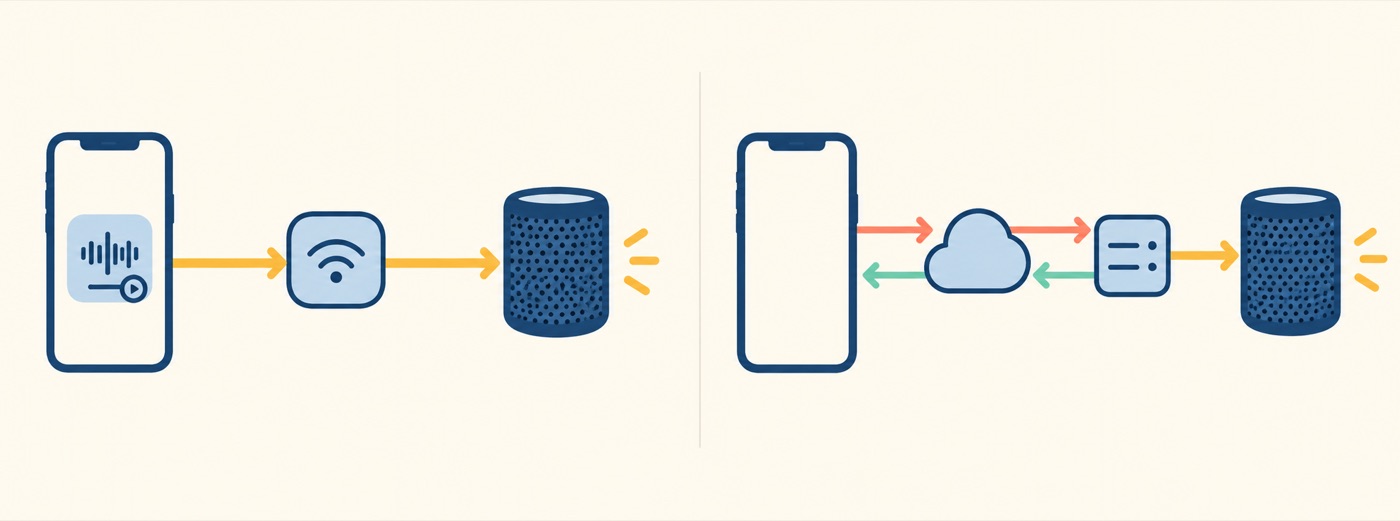
The shared attributes are Codable and carry a stable session ID plus the state the extension needs:
import Foundation
import NowPlaying

struct SpeakerSessionState: RemoteMediaSessionAttributes {
    let id: String
    let soundID: String
    let soundName: String
    let isPlaying: Bool
    let updatedAt: Date
}

@MainActor
func startRemotePlayback(
    state: SpeakerSessionState
) async throws -> RemoteMediaSession<SpeakerSessionState> {
    let session = try await RemoteMediaSession.start(attributes: state)
    try await session.requestToBecomeSystemPrimary()
    return session
}
The system must receive later state with the same ID. Call update(_:) when the external device changes, and end() when the session finishes. The extension creates its representable from those attributes, exposes content and commands, lists the participating MediaDevice values, and forwards commands to the server. Its update(_:) replaces stored attributes so Observation can refresh the surface.
Apple also supports starting, updating, and ending remote sessions through Now Playing push notifications. That allows the system to launch the extension when the main app is not running. Treat the push payload as untrusted network input: authenticate your server-side event source, keep identifiers opaque, minimize metadata, and make updates idempotent. Register changing push tokens with your server rather than assuming they are permanent.
Remote volume deserves special care. A MediaDevice can publish absolute volume or relative increment/decrement capability. Advertise what the hardware truly supports and clamp values at the network boundary. A slider connected to a step-only speaker will otherwise oscillate between invented and reported values.
7. Understand Media Sharing Extensions
WWDC26 also introduced Media Sharing Extensions for routing content from iPhone to third-party speakers and TVs through the system device picker. Protocol implementations live outside the app and are managed by the system, so an app can focus on describing the content it wants to play instead of embedding every vendor SDK.
Think of the pieces this way: a local MediaSession describes playback on the current device; a RemoteMediaSession donates known playback happening elsewhere; a Media Sharing Extension helps the person choose and route to supported devices. They may participate in one product flow, but they solve different problems. Follow Apple’s routing media to third-party devices guidance before adding an extension target or replacing a vendor integration.
8. Migrate Without Two Control Planes
Existing apps commonly write dictionaries to MPNowPlayingInfoCenter and install handlers on MPRemoteCommandCenter. The new model is cleaner because metadata, state, and commands live together in an observable type. Migration still needs a hard boundary.
Apple explicitly warns that mixing the Now Playing framework with MPNowPlayingInfoCenter and MPRemoteCommandCenter for local playback produces undefined behavior. Choose one path for a session. A practical rollout is to put the new implementation behind an iOS 27 availability boundary, keep the legacy implementation on older systems, and ensure only one adapter is constructed at runtime.
Do not perform a mechanical key-for-property translation. Revisit identity, choose the correct structured content type, derive the playback snapshot from the engine, and expose only supported commands. Keep AVAudioSession, buffering, interruption handling, and the audio engine itself; Now Playing publishes and controls playback, but it does not replace those layers.
If Siri or the Action button should start an ambient sound, expose the same domain action through a thin App Intent adapter. The intent starts playback through the coordinator; it should not maintain another media state store.
9. Ship with Failure Cases in the Test Plan
Before release, validate more than the happy path:
- Start, pause, skip, and resume from the app, Lock Screen, Control Center, headset, CarPlay, and Apple Watch where available.
- Lock the device, background and terminate the app, interrupt audio with a call, and disconnect the active route.
- Test finite content near zero and the end, plus live content with no elapsed timeline.
- Make artwork slow, unavailable, oversized, and corrupt; confirm playback and commands remain usable.
- Deny the remote device network, duplicate an update, deliver an older update, and rotate the push token.
- Verify that ending playback removes stale system UI and deactivates the audio session responsibly.
Observe failures around session promotion, command latency, artwork loading, and remote update age. Avoid recording content titles or artwork URLs in analytics unless they are necessary and covered by your privacy policy. Stable opaque IDs usually provide enough diagnostic value.
Key Takeaways
- Model Now Playing as an observable projection of one authoritative playback engine.
- Publish stable session identity, structured content, an honest playback snapshot, and only commands the player can execute.
- Retain
MediaSession, request primary status deliberately, and release the session when playback ends. - Feed interruptions, route changes, failures, and external-device updates back into the same state owner.
- Use remote media sessions for authoritative playback on external devices and Media Sharing Extensions for system-managed routing.
- Migrate each local session completely; never run the new framework beside
MPNowPlayingInfoCenterandMPRemoteCommandCenterfor that session.
The new framework removes a great deal of manual plumbing, but its real advantage is architectural: the app and the system finally read the same playback model. Once your audio engine remains the source of truth and every control path reconciles through it, a pause button on any supported surface means the same thing.